Warp Documents
Document control with revisions and read confirmations
Procedures, policies and forms with revisions, approval, effective dates and “I have read and understood” confirmations — so everyone works from the current revision, and you can show an auditor who approved and read what.
Single Project $99 · Unlimited Projects $199
1.1.0 passed all 42 setups · Nov 23, 2026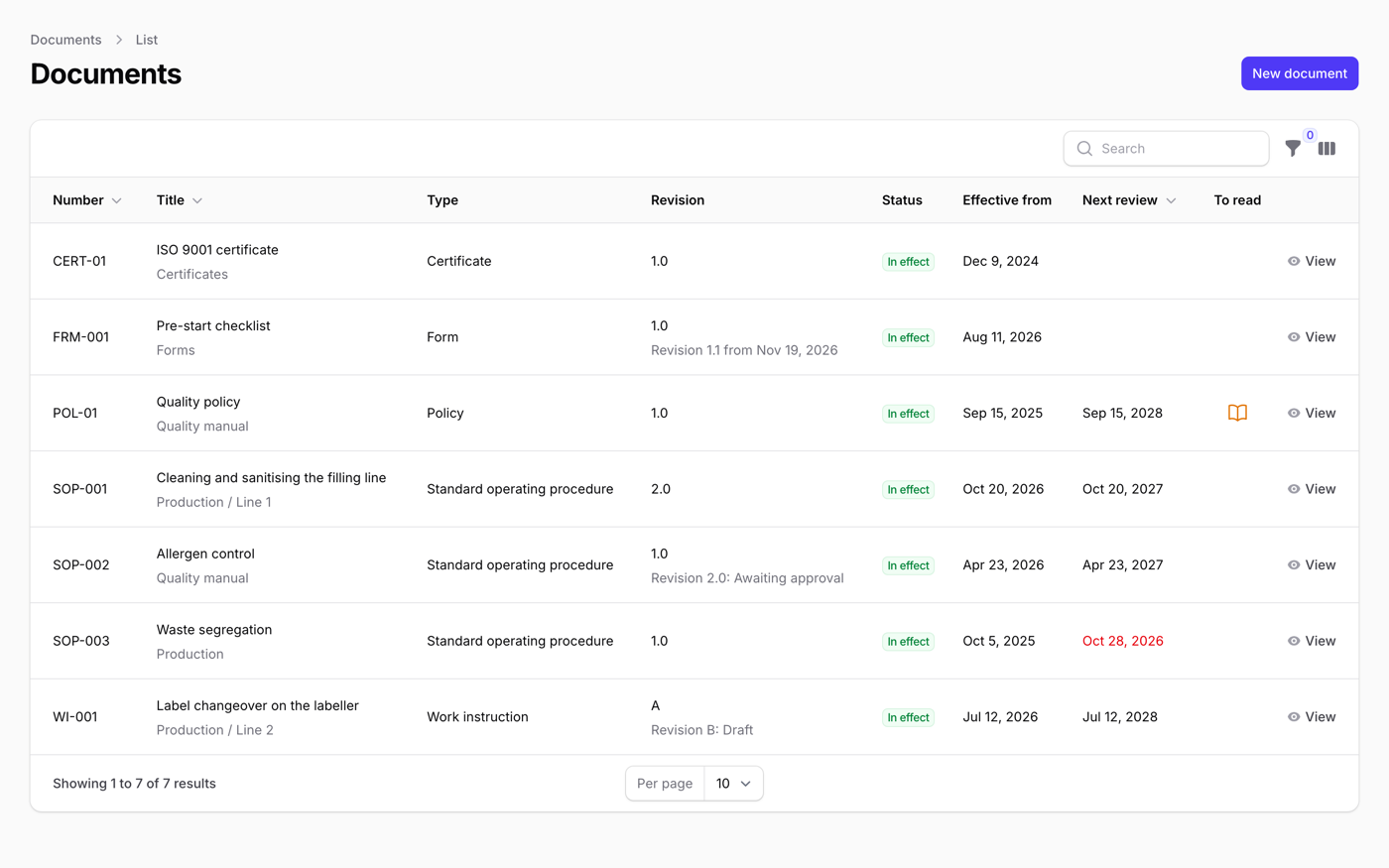
What it does
- One current, approved revision for everyone; a new revision stays a draft until it is approved
- Upload PDF, Word, Excel and images, or write a page in the panel; Word, Excel and PowerPoint files are shown as PDF
- Built-in approval by person or group, one after another or all at once, or hand the approval to Warp Flow
- "Read and understood" confirmations per revision, a matrix of people and documents, and reminders for reviews and expiry
- Redline comparison, controlled copies stamped with a copy number and QR code, bulk import from Excel or CSV with a ZIP, and search inside the files
Watch it work
Short clips recorded in the live demo. Each one links to the page it was recorded on, so you can try it yourself.
Revise, approve, one current revision
Press “Revise” on a procedure, change the page and submit it with what changed. Switch to the two approvers and approve: revision 2.0 becomes the current one, and its readers are asked to confirm it.
Try it in the demo →See what changed, word by word
Open More → “Compare revisions”. In 1.0 → 2.0 of the cleaning procedure, 70 is struck through and 80 underlined, and the new swab step is underlined in green.
Try it in the demo →Two questions before “I have read and understood”
A line operator opens the weekly metal detector check and answers two questions. One wrong answer records nothing and says how many were right; answer again and the confirmation is saved, with the number of tries.
Try it in the demo →A numbered paper copy that knows if it is current
Print a controlled copy and the PDF is stamped with its number, who it is for, who printed it, the date and a QR code. Scan it: green if the revision is current, red (“Do not use this copy”) once a newer one is in effect.
Try it in the demo →Who has read what, on one sheet
People down the side, documents across the top: green with the date they read it, red when overdue. Show only the people who still have to read, export to Excel with the colors, or open a document to remind them.
Try it in the demo →Import an Excel register and a ZIP
Drop in the register and the ZIP and press “Check the files”: nothing is saved yet. Three rows are ready and two say in red what to fix. Import the ready ones and they appear in the list with their numbers, revisions and effective dates.
Try it in the demo →Questions about Warp Documents
- No questions yet. Ask the first one.
More plugins
Filament + AI coding tips, by email
How to fit Warp plugins into your own app and pair them with Claude Code or Cursor: prompts that work, mistakes AI makes, real examples. Once or twice a month. Unsubscribe anytime.
Thanks! You're on the list.
