Warp Input
The fields business apps type into every day
Phone numbers for every country, addresses filled in from the postal code, money with tax and rounding, IDs with check digits, signatures and barcode scanning — each a drop-in replacement for the Filament field you use today.
Single Project $5 · Unlimited Projects $10
1.1.3 passed all 42 setups · Nov 20, 2026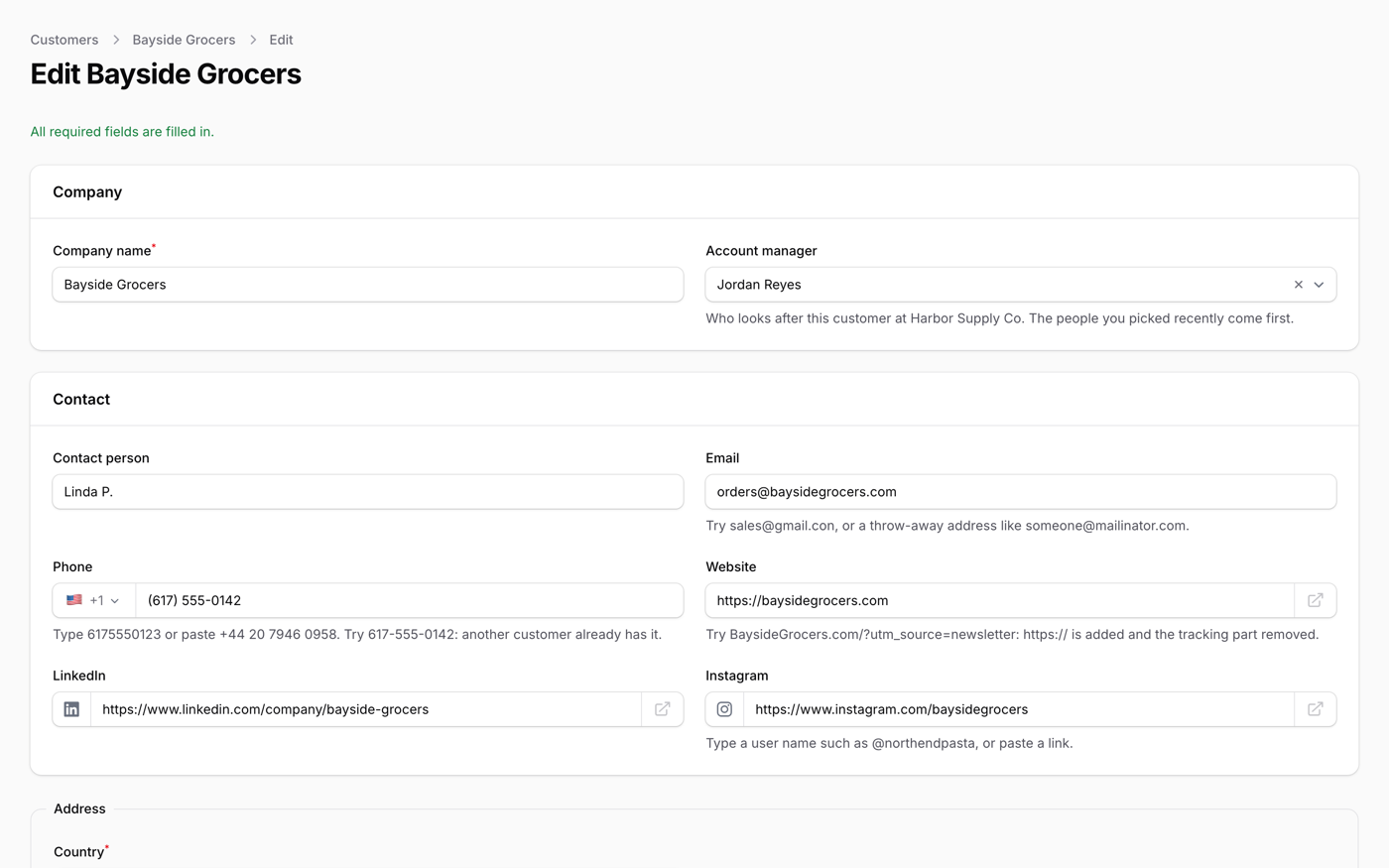
What it does
- PhoneInput (saved as E.164, mobile-only option, click to call), EmailInput (typos and throwaway addresses) and UrlInput
- "This customer already exists" while typing, with one line: ->warnDuplicates(Customer::class)
- AddressFields: the fields follow the country, and the postal code fills in the state and city
- MoneyInput, NumberInput, DiscountInput and ->calculate() for price × quantity, worked out again on the server
- FormAssist: drafts that survive a closed tab, a warning when someone else saved first, and Enter to the next field; plus a signature pad and barcode or QR scanning
Watch it work
Short clips recorded in the live demo. Each one links to the page it was recorded on, so you can try it yourself.
Phone numbers, formatted as you type
Type 6175550142 and it becomes (617) 555-0142. Leave the field and it says another customer already has this number, with a link to them. Paste a UK or Japanese number and the flag follows.
Try it in the demo →Addresses from the ZIP code
Type 02110: City and State fill in and the map moves to Boston. Find the typed address on the map, or click the map to fill in the address of that place.
Try it in the demo →Quotes that add up as you type
Pick the customer by their initials, then a product: the price and box size come in, 120 becomes 150 for full boxes, and a 10% discount recalculates the subtotal, tax and total.
Try it in the demo →Typos in email and web addresses
gmail.con is fixed with one click, tracking parameters are removed from a pasted link, and an @handle becomes the Instagram profile link.
Try it in the demo →Drafts that survive a closed tab
Type a new customer and reload the page: Restore brings everything back. The list of required fields that are still empty takes you to each one.
Try it in the demo →In your code
// In a form schema
FormAssist::make()->drafts()->conflicts(),
PhoneInput::make('phone')->warnDuplicates(Customer::class),
EmailInput::make('email')->rejectDisposable(),
AddressFields::make(),Install
After buying, you get an email address and a license key for the private Composer repository. The full steps are in the docs.
composer config repositories.qalainau composer https://qalainau.privato.pub/composer
composer config --auth http-basic.qalainau.privato.pub "your-email" "your-license-key"
composer require qalainau/filament-warp-inputThen run the migrations for the plugin's own tables:
php artisan migrateQuestions about Warp Input
- No questions yet. Ask the first one.
More plugins
Filament + AI coding tips, by email
How to fit Warp plugins into your own app and pair them with Claude Code or Cursor: prompts that work, mistakes AI makes, real examples. Once or twice a month. Unsubscribe anytime.
Thanks! You're on the list.
