Warp Flow
Approval flows that know your organization
“The applicant's manager, then the department director” is worked out for every request from your departments and positions, with returns, delegation, due times and a thread per request.
Single Project $99 · Unlimited Projects $199
1.3.0 passed all 42 setups · Nov 23, 2026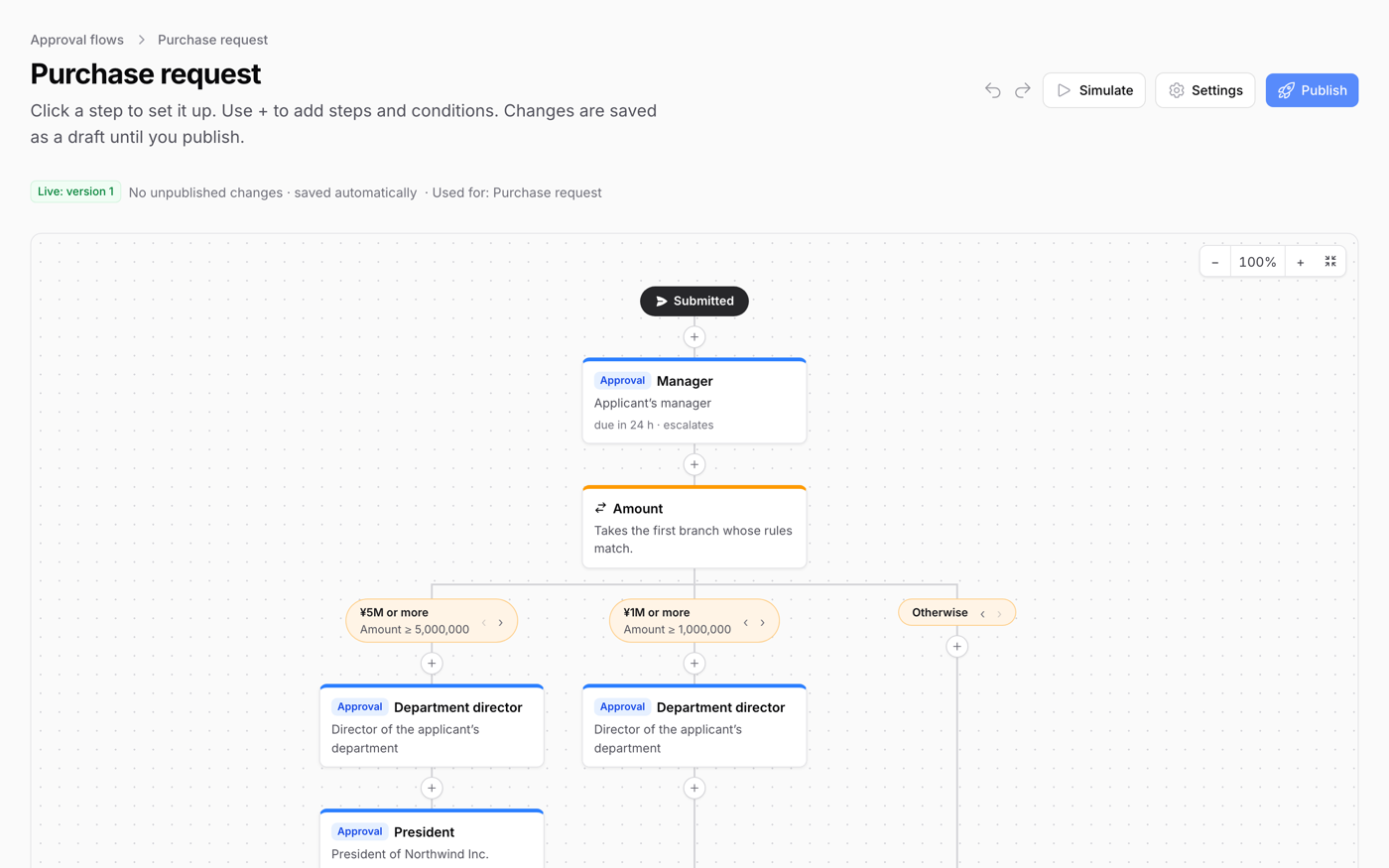
What it does
- Approval routes worked out from your org chart: the applicant's manager, two levels up, up to a director, the finance manager
- Branches by amount, category, department or rank, using the fields your model declares
- Approval, consultation, for-information and after-the-fact review steps, and parallel steps where everyone, anyone or N people must approve
- The submit dialog and a route simulator show who a request goes to before it is sent, and people approve or return it straight from the email
- A thread per request with @mentions, an approval inbox, versions of each flow, an audit log that only grows, and a PDF of the request with its approvals
Watch it work
Short clips recorded in the live demo. Each one links to the page it was recorded on, so you can try it yourself.
A route worked out before you send
Press “Submit for approval” on a purchase request: every step and person is listed before anything is sent. Raise the unit price to 5,000,000 and the President is added, while a director who already approves is skipped.
Try it in the demo →Approve and stamp
Open a request from the inbox (overdue ones in red), approve it with a comment, and a red “Approved” stamp with the date appears. The request moves on to Finance.
Try it in the demo →Returned, fixed and resubmitted
Finance returns an expense claim. Change the amount from 48,000 to 46,500, resubmit, and the request shows what changed. It goes back to Finance, not to the start.
Try it in the demo →Simulate a flow
In the flow editor, pick an applicant, an amount and a category: the route lights up on the flow. Try 6,000,000 and it takes the branch that adds the President.
Try it in the demo →Org chart on any date
Departments, heads and members, with concurrent posts. Find Sofia, change the date, and see her in her next department.
Try it in the demo →In your code
// In the panel provider
$panel
    ->databaseNotifications()
    ->plugin(
        FilamentWarpFlowPlugin::make()
            ->models([PurchaseRequest::class, ExpenseClaim::class])
            ->canManage(fn (User $user) => $user->is_admin),
);Install
After buying, you get an email address and a license key for the private Composer repository. The full steps are in the docs.
composer config repositories.qalainau composer https://qalainau.privato.pub/composer
composer config --auth http-basic.qalainau.privato.pub "your-email" "your-license-key"
composer require qalainau/filament-warp-flowThen run the migrations for the plugin's own tables:
php artisan migrateQuestions about Warp Flow
- No questions yet. Ask the first one.
More plugins

Filament + AI coding tips, by email
How to fit Warp plugins into your own app and pair them with Claude Code or Cursor: prompts that work, mistakes AI makes, real examples. Once or twice a month. Unsubscribe anytime.
Thanks! You're on the list.
