Warp Painter
Draw on the pictures in your upload fields
Add one line to a FileUpload and every uploaded picture opens in a full-screen editor: arrows, numbered markers, text, logos, blurred faces and plates, cropping. Press Done and the picture is saved like any other upload. Open it next week and the arrow is still an arrow you can move.
Single Project $29 · Unlimited Projects $59
1.0.2 passed all 42 setups · Nov 22, 2026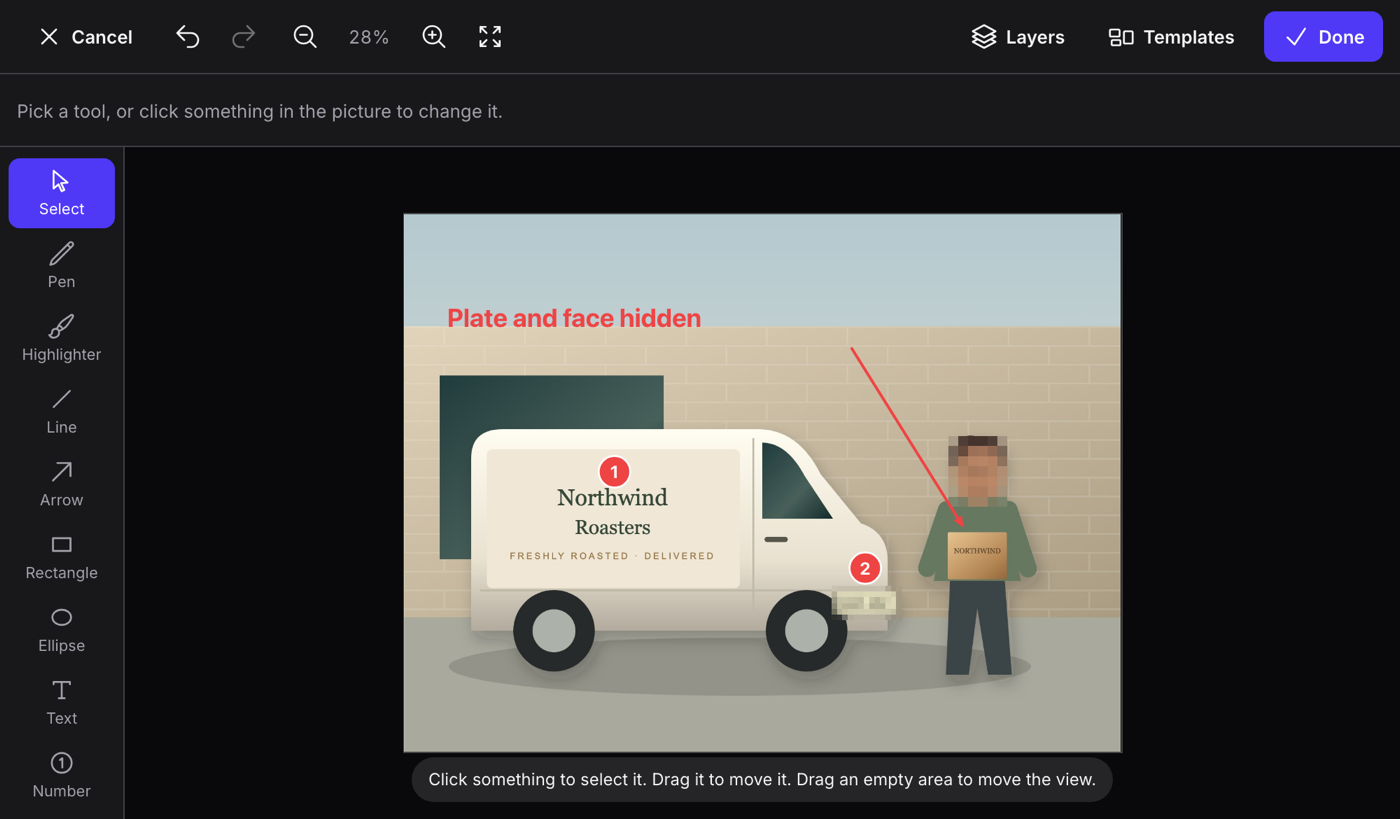
What it does
- One line on FileUpload or SpatieMediaLibraryFileUpload; Filament still uploads, validates and saves the picture
- Pen, highlighter, lines, arrows, boxes, circles, four kinds of text, numbers that count up, and logos or stamps from your own list
- Blur, mosaic or a solid box that is burned in on Done: the hidden pixels are kept nowhere, not in the file and not on the server
- Layers stay editable: open the picture again later and move the arrow or change the text, whatever the file was renamed to
- Shared templates with locked items, crop to exact sizes, form values in text, ten languages, and tenancy
Watch it work
Short clips recorded in the live demo. Each one links to the page it was recorded on, so you can try it yourself.
Mark up a photo with an arrow and numbers
Open a photo of a crack from the upload field, draw an arrow to it, drop numbers 1 and 2 and write a note. Done puts the marked-up picture back into the field.
Try it in the demo →Hide a face and a number plate for good
A mosaic over the face and a solid box over the plate. On Done they are burned into the picture: open it again and the hidden pixels are gone from the layers too.
Try it in the demo →Open it again next week and move the arrow
Save the record, reload the page and press the pencil: the arrow and the numbers come back as separate items you can still move and change.
Try it in the demo →Start a new picture from a shared template
New picture, then the Sale frame template: the frame and the logo are locked, so you only change the text before you press Done.
Try it in the demo →Place a logo or an Approved stamp
The Image tool offers the logos and stamps your app lists. Drop one on the photo, drag it into place and make it smaller.
Try it in the demo →Crop to an exact size for the web
Pick Web banner in the crop tool and apply it. The saved picture is exactly 1200 × 630, ready for a page or a social post.
Try it in the demo →In your code
// Draw on the pictures in an upload field
FileUpload::make('photo')
    ->image()
    ->painter(fn (Painter $painter) => $painter
        ->tools(['arrow', 'marker', 'text', 'redact', 'crop'])
->templates('photos')),Install
After buying, you get an email address and a license key for the private Composer repository. The full steps are in the docs.
composer config repositories.qalainau composer https://qalainau.privato.pub/composer
composer config --auth http-basic.qalainau.privato.pub "your-email" "your-license-key"
composer require qalainau/filament-warp-painterQuestions about Warp Painter
- No questions yet. Ask the first one.
More plugins

Filament + AI coding tips, by email
How to fit Warp plugins into your own app and pair them with Claude Code or Cursor: prompts that work, mistakes AI makes, real examples. Once or twice a month. Unsubscribe anytime.
Thanks! You're on the list.
