Warp Markup
Pin findings on drawings and photos
Drop pins on PDF drawings and photos, sketch clouds, arrows and dimensions, and track every finding as your own model, with status, assignee, due date and revisions.
Single Project $99 · Unlimited Projects $199
1.6.1 passed all 42 setups · Nov 20, 2026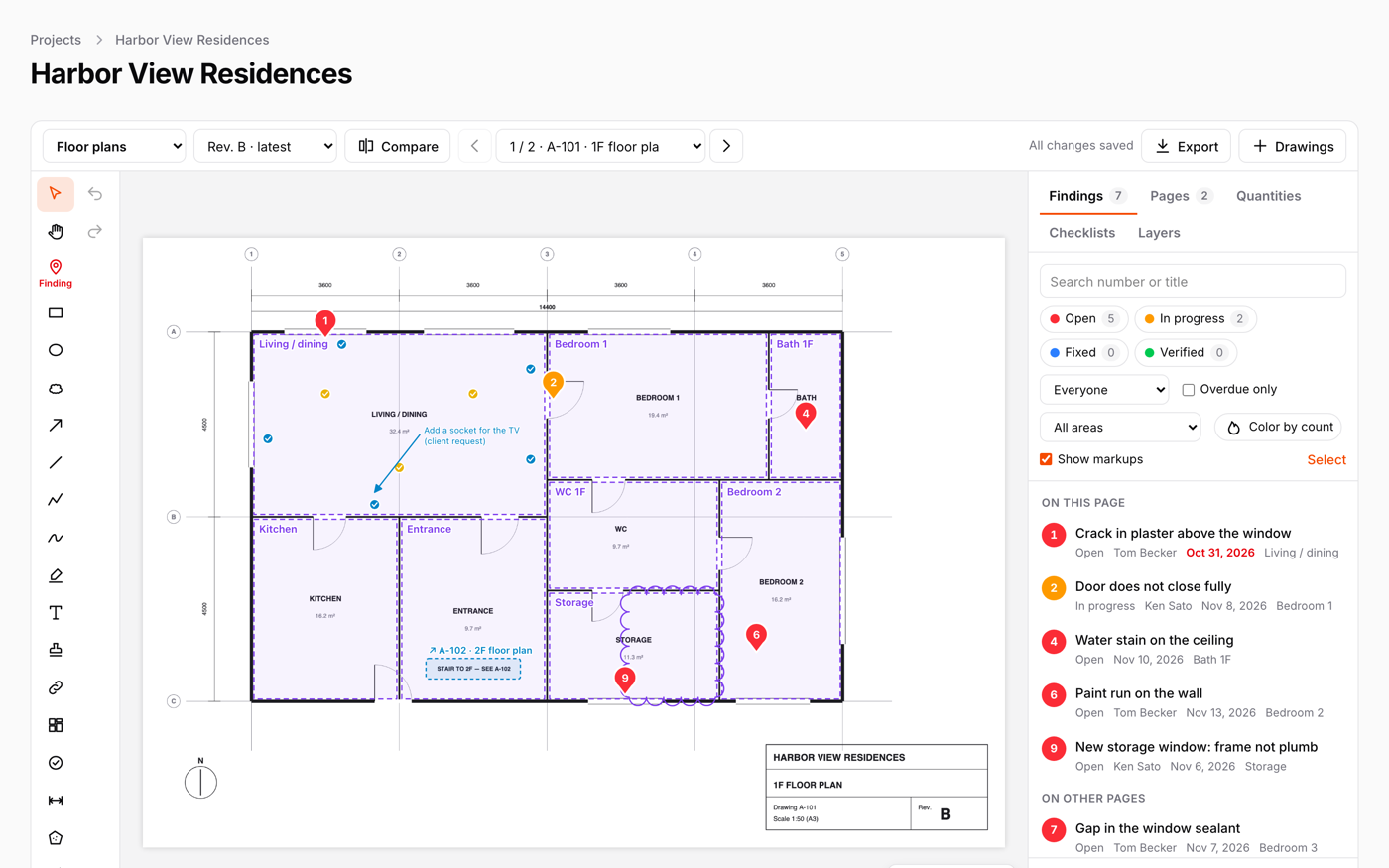
What it does
- Pin findings on PDF drawings and photos; each pin is a row of your own model, with your own form, policies and exports
- Pins, rectangles, ellipses, revision clouds, arrows, polylines, pen, highlighter, text, stamps, and length and area to scale
- PDF pages stay sharp at any zoom, and the marked-up PDF or a PNG is exported from the browser
- Upload a new revision of a drawing: open findings move to it with their numbers, and two revisions compare as an overlay or with a slider
- Photos from the phone camera, status, assignee and due date, bulk changes, share links for subcontractors, and a findings report
Watch it work
Short clips recorded in the live demo. Each one links to the page it was recorded on, so you can try it yourself.
Click the drawing to leave a finding
Click where the problem is on a PDF floor plan and fill in your own form: the pin gets a number, and the room is filled in from where you clicked.
Try it in the demo →Mark up the drawing
Draw revision clouds, arrows and notes on the PDF. The ruler reads millimetres from the 1:50 scale, and every stroke is saved by itself.
Try it in the demo →See what changed in revision B
Lay two revisions over each other (red is only in A, blue only in B) and press “Cloud the changes”. Every difference gets a cloud, and open findings move to the new revision.
Try it in the demo →Subcontractors reply without an account
Tick the findings and make a share link. The subcontractor opens it without signing in and replies with a comment, a photo and “Fixed”. Your panel shows it at once.
Try it in the demo →Circle the problem on the photo
Draw on a site photo, and when the repair photo comes in, slide between before and after on the finding itself.
Try it in the demo →A report for the client
Export → Findings report: a cover with the counts, every drawing with its numbered pins, and every finding with a crop of the plan and its photos. CSV and BCF too.
Try it in the demo →Install
After buying, you get an email address and a license key for the private Composer repository. The full steps are in the docs.
composer config repositories.qalainau composer https://qalainau.privato.pub/composer
composer config --auth http-basic.qalainau.privato.pub "your-email" "your-license-key"
composer require qalainau/filament-warp-markupThen run the migrations for the plugin's own tables:
php artisan migrateQuestions about Warp Markup
- No questions yet. Ask the first one.
More plugins
Filament + AI coding tips, by email
How to fit Warp plugins into your own app and pair them with Claude Code or Cursor: prompts that work, mistakes AI makes, real examples. Once or twice a month. Unsubscribe anytime.
Thanks! You're on the list.
