Warp Mega Menu
Mega menus for your Filament admin panel
Your navigation groups open as wide panels with columns, descriptions and live counts, plus search, favorites, a sidebar flyout and a menu editor per role.
Single Project $29 · Unlimited Projects $59
1.4.3 passed all 42 setups · Nov 20, 2026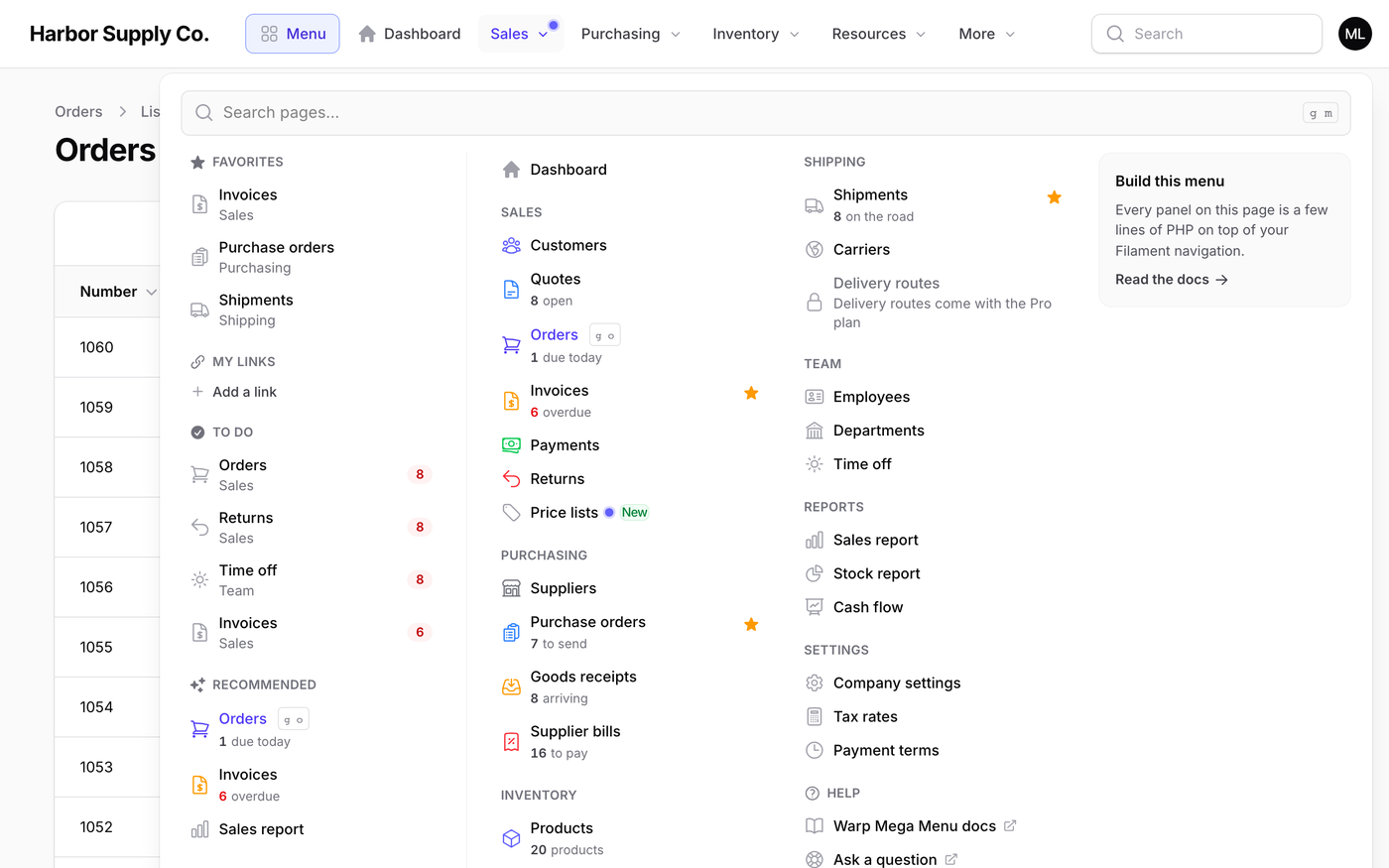
What it does
- With top navigation on, every navigation group opens as a wide panel with columns, descriptions, colored icons and badges
- Nothing to configure: pages a person may not open (canAccess(), policies) are left out, also from the search
- A launcher with search, favorites and recently opened pages and records (jump straight to "#1042")
- A flyout for the sidebar and a full-screen drawer on phones; the menu is drawn on the server with about 5 KB of JavaScript
- Admins rearrange the menu in an editor; favorites and recents are kept per person, panel and tenant
Watch it work
Short clips recorded in the live demo. Each one links to the page it was recorded on, so you can try it yourself.
Every group opens as a mega panel
Click Sales: columns, a line under every page, numbers like “6 overdue” and a card. Point at the next group and the panel switches.
Try it in the demo →Press g, then m, to find any page
Outside a text box, press g and then m: the search opens. Type a few letters for pages and actions like “New invoice”, or an order number like #1056 to open that order.
Try it in the demo →Star the pages you use every day
A star puts the page at the top of the Menu. Pressing g then 1 opens the first group, and g then o jumps to Orders.
Try it in the demo →Change the menu without a deploy
In the editor, rename Customers to Clients, add a VIP badge and save. Everyone sees it at once.
Try it in the demo →Keep the sidebar
The sidebar lists only the groups. Click one and its panel opens beside it; move down and the panel follows.
Try it in the demo →A different menu for each team
Pick “Warehouse team” in the editor and hide Sales for them. Everyone else still has Sales.
Try it in the demo →In your code
// In the panel provider
$panel
    ->topNavigation()
->plugin(FilamentWarpMegaMenuPlugin::make());Install
After buying, you get an email address and a license key for the private Composer repository. The full steps are in the docs.
composer config repositories.qalainau composer https://qalainau.privato.pub/composer
composer config --auth http-basic.qalainau.privato.pub "your-email" "your-license-key"
composer require qalainau/filament-warp-megamenuThen run the migrations for the plugin's own tables:
php artisan migrateQuestions about Warp Mega Menu
- No questions yet. Ask the first one.
More plugins
Filament + AI coding tips, by email
How to fit Warp plugins into your own app and pair them with Claude Code or Cursor: prompts that work, mistakes AI makes, real examples. Once or twice a month. Unsubscribe anytime.
Thanks! You're on the list.
