Warp Tree
Departments and categories as a fast tree
Pick from a tree of 50,000 items as fast as from 20, show the path in tables, filter a table by a branch, let people see only their own branch, and rearrange the tree by dragging.
Single Project $29 · Unlimited Projects $59
1.1.0 passed all 42 setups · Nov 22, 2026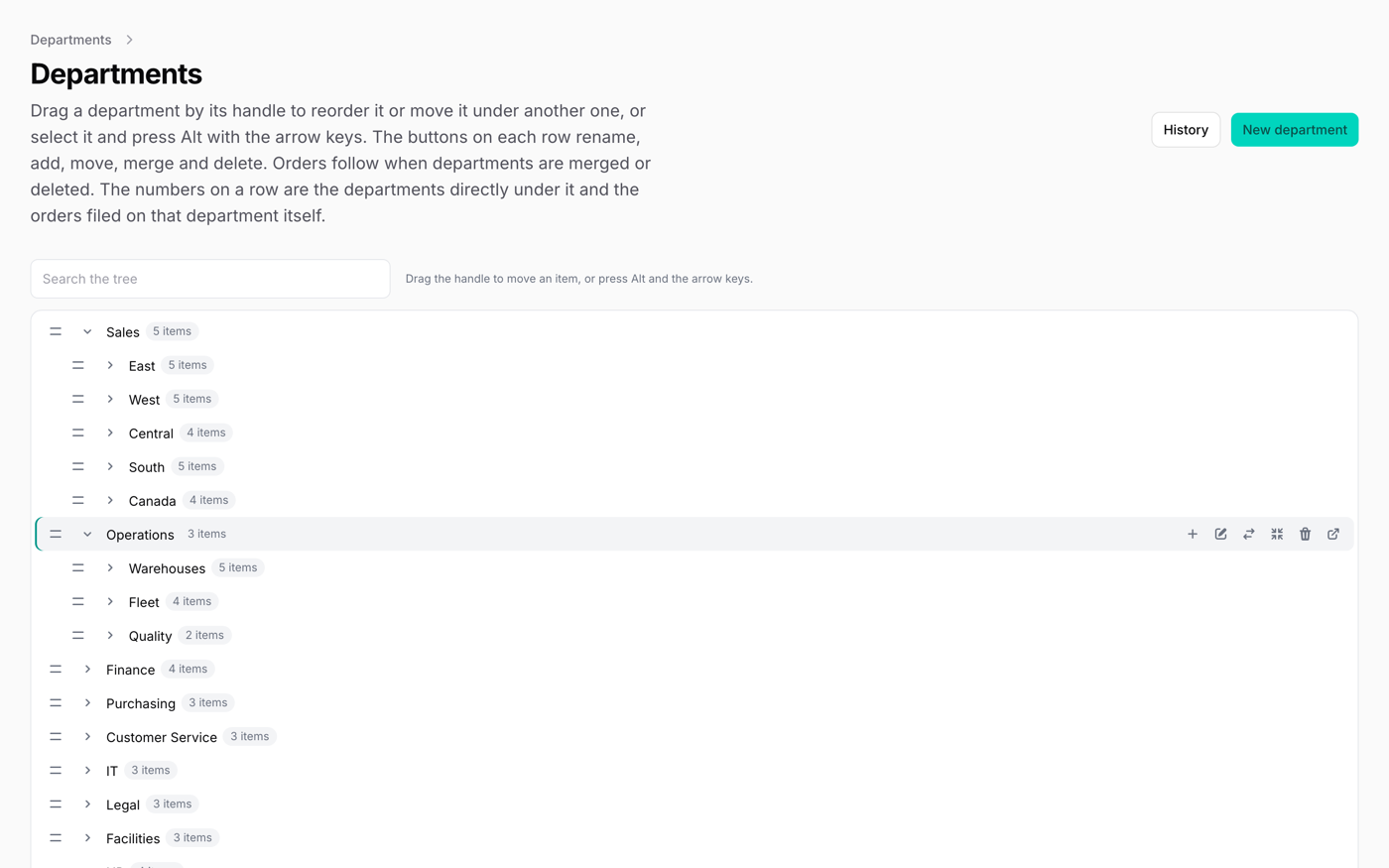
What it does
- SelectTree replaces Select: pick from a tree of departments, categories or accounts and see the path, "Sales › East › Boston"
- Fast with large trees: only the branch you open is read, 100 items at a time, so 50,000 items cost the same as 20
- Only a parent_id column is needed; optional nested-set columns read a whole branch in one query
- CheckboxTree, TreeBuilder, TreeFilter (a branch and everything under it) and TreePathColumn
- A tree beside a list page (drag rows onto a branch to move them), and a table whose rows are the tree, with totals on the parent rows
Watch it work
Short clips recorded in the live demo. Each one links to the page it was recorded on, so you can try it yourself.
Only their own branch
Choose the head of the East office: the departments go from 193 to 21 and the orders from 60 to 5. Lists, filters and the tree show the East branch only.
Try it in the demo →Filter a table by a branch
Pick East in the orders filter and apply: the orders of East and of every team under it, and nothing else.
Try it in the demo →Delete a department, keep its orders
Field sales still has an order. Delete it and you are asked where the order should go; choose Inside sales and it moves there.
Try it in the demo →A tree of 52,000 items
Each branch is read when it is opened, in small requests. Search for a shelf and it shows up inside its branches.
Try it in the demo →Edit the tree by dragging
Drag West above East, move Central with Alt and the arrow keys, then open History to see who moved what.
Try it in the demo →Table rows as a tree
Open Expenses and its rows show under it, with the total of everything below on each parent row.
Try it in the demo →In your code
// In the form schema
SelectTree::make('department_id')
->relationship('department', 'name', parentAttribute: 'parent_id')Install
After buying, you get an email address and a license key for the private Composer repository. The full steps are in the docs.
composer config repositories.qalainau composer https://qalainau.privato.pub/composer
composer config --auth http-basic.qalainau.privato.pub "your-email" "your-license-key"
composer require qalainau/filament-warp-treeThen run the migrations for the plugin's own tables:
php artisan migrateQuestions about Warp Tree
- No questions yet. Ask the first one.
More plugins
Filament + AI coding tips, by email
How to fit Warp plugins into your own app and pair them with Claude Code or Cursor: prompts that work, mistakes AI makes, real examples. Once or twice a month. Unsubscribe anytime.
Thanks! You're on the list.
