Warp Import
Imports you can review, fix and undo
Runs your existing Importer classes with a review step: see every new, changed and broken row before saving, fix it in place, undo it later.
Single Project $29 · Unlimited Projects $59
1.3.1 passed all 42 setups · Nov 20, 2026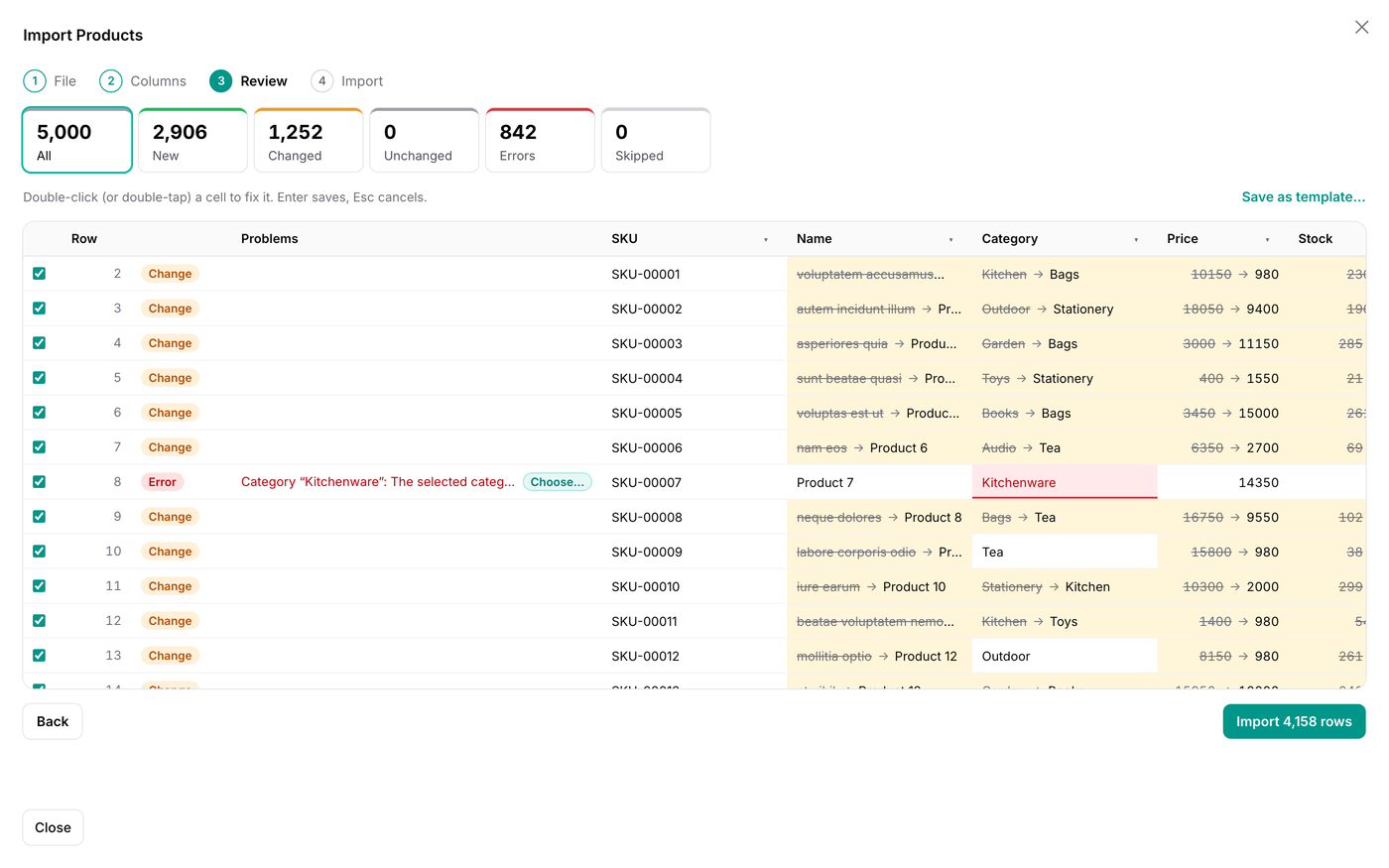
What it does
- Swap Filament's ImportAction for WarpImportAction: your importer class, with its columns, rules and hooks, is used as it is
- CSV, TSV, Excel and pasted cells, in Shift_JIS, Windows-1252 and other encodings, with the columns matched by name
- A review before anything is saved: every row is new, changed (old and new value per field), unchanged or an error, and you fix cells in place
- Clean-up per column ("$1,200", "(300)", dates, Excel serial numbers, decimal commas) and mapping of values to options or related records
- Undo for 30 days, parent and child sheets, saved templates, an approval step, and scheduled imports from a URL or Google Sheets
Watch it work
Short clips recorded in the live demo. Each one links to the page it was recorded on, so you can try it yourself.
See every row before it is imported
Pick a CSV: the columns are guessed, and every new row, every changed value (old → new) and every error is shown before anything is saved.
Try it in the demo →Fix mistakes in the review
Double-click a cell and type the right value, or choose a known category with “Choose…”. The row is checked again at once.
Try it in the demo →Map values the column does not know
“UK”, “Deutschland” and “VIP” are mapped once to the options of the column, for every row that has them.
Try it in the demo →Undo an import
Open it from the Imports page and undo it: new records are deleted, and changed ones get their old values back.
Try it in the demo →One person imports, another approves
Ask for approval with a note. The manager checks the same rows and approves them or sends the import back.
Try it in the demo →In your code
// In the List page
protected function getHeaderActions(): array
{
    return [
        // was: ImportAction::make()->importer(ProductImporter::class)
        WarpImportAction::make()->importer(ProductImporter::class),
    ];
}Install
After buying, you get an email address and a license key for the private Composer repository. The full steps are in the docs.
composer config repositories.qalainau composer https://qalainau.privato.pub/composer
composer config --auth http-basic.qalainau.privato.pub "your-email" "your-license-key"
composer require qalainau/filament-warp-importThen run the migrations for the plugin's own tables:
php artisan migrateQuestions about Warp Import
- No questions yet. Ask the first one.
More plugins
Filament + AI coding tips, by email
How to fit Warp plugins into your own app and pair them with Claude Code or Cursor: prompts that work, mistakes AI makes, real examples. Once or twice a month. Unsubscribe anytime.
Thanks! You're on the list.
