Warp Mobile
Your panel as an app on a phone
A bottom tab bar, tables that turn into cards, swipe actions, pull to refresh and bottom sheets, only below the width you choose. Your resources, pages and permissions stay as they are, and wider screens do not change.
Single Project $5 · Unlimited Projects $10
1.0.0 passed all 42 setups · Nov 20, 2026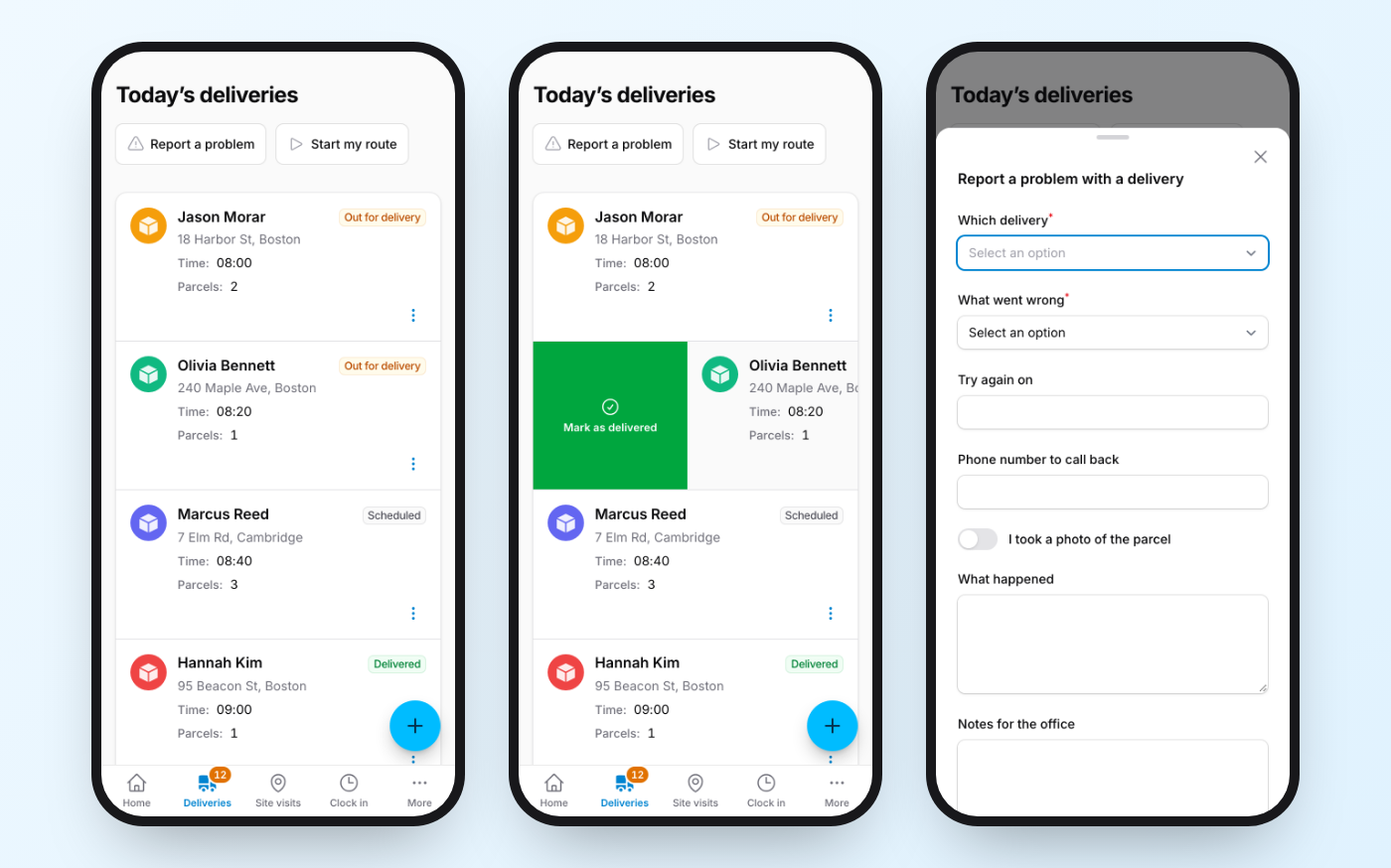
What it does
- A bottom tab bar from your panel's navigation (or your own tabs), with badges, a More tab that opens the menu, and a back button for home-screen apps
- $table->mobileCards() turns rows into cards with a title, subtitle, badge and photo; tapping a card opens the record
- Swipe a card to reveal its own row actions: Filament's actions with their labels, colors, confirmations and permissions, and a full swipe runs the first one
- Pull to refresh that updates the Livewire components without losing half-typed input; modals slide up as bottom sheets you can drag closed
- A floating action button, bigger tap targets, an installable home-screen app for iPhone, right-to-left support, and no change at all on wide screens
Watch it work
Short clips recorded in the live demo. Each one links to the page it was recorded on, so you can try it yourself.
A table as cards, with a tab bar
mobileCards() turns every row into a card with a title, address and badge instead of a grid you scroll sideways. The tab bar at the bottom has a count and steps aside when you scroll down.
Try it in the demo →Swipe a card to act on it
Swipe right for Mark as delivered, left for Not home and Edit. A full swipe runs the first button, and confirmations still ask.
Try it in the demo →Pull the list down to see what changed
The office adds a delivery, you pull the list down, and it shows up first. Nothing to write.
Try it in the demo →Forms and confirmations as bottom sheets
Modals slide up from the bottom. Drag the handle to close one; a confirmation you must answer stays put. A round button adds a delivery.
Try it in the demo →On a wide screen, nothing changes
Warp Mobile only acts below the width you choose. On a desktop it is the normal Filament table; narrow the window and the cards and tab bar appear.
Try it in the demo →In your code
// A bottom tab bar, and your tables become cards on a phone
$panel->plugin(FilamentWarpMobilePlugin::make());

$table->mobileCards()->swipeActions(leading: 'delivered', trailing: ['edit']);Install
After buying, you get an email address and a license key for the private Composer repository. The full steps are in the docs.
composer config repositories.qalainau composer https://qalainau.privato.pub/composer
composer config --auth http-basic.qalainau.privato.pub "your-email" "your-license-key"
composer require qalainau/filament-warp-mobileQuestions about Warp Mobile
- No questions yet. Ask the first one.
More plugins
Filament + AI coding tips, by email
How to fit Warp plugins into your own app and pair them with Claude Code or Cursor: prompts that work, mistakes AI makes, real examples. Once or twice a month. Unsubscribe anytime.
Thanks! You're on the list.
