Warp Pivot
Pivot tables that add up in the database
GROUP BY queries instead of loading records into the browser, so a million source rows are no heavier than a hundred.
Single Project $69 · Unlimited Projects $149
1.10.2 passed all 42 setups · Nov 20, 2026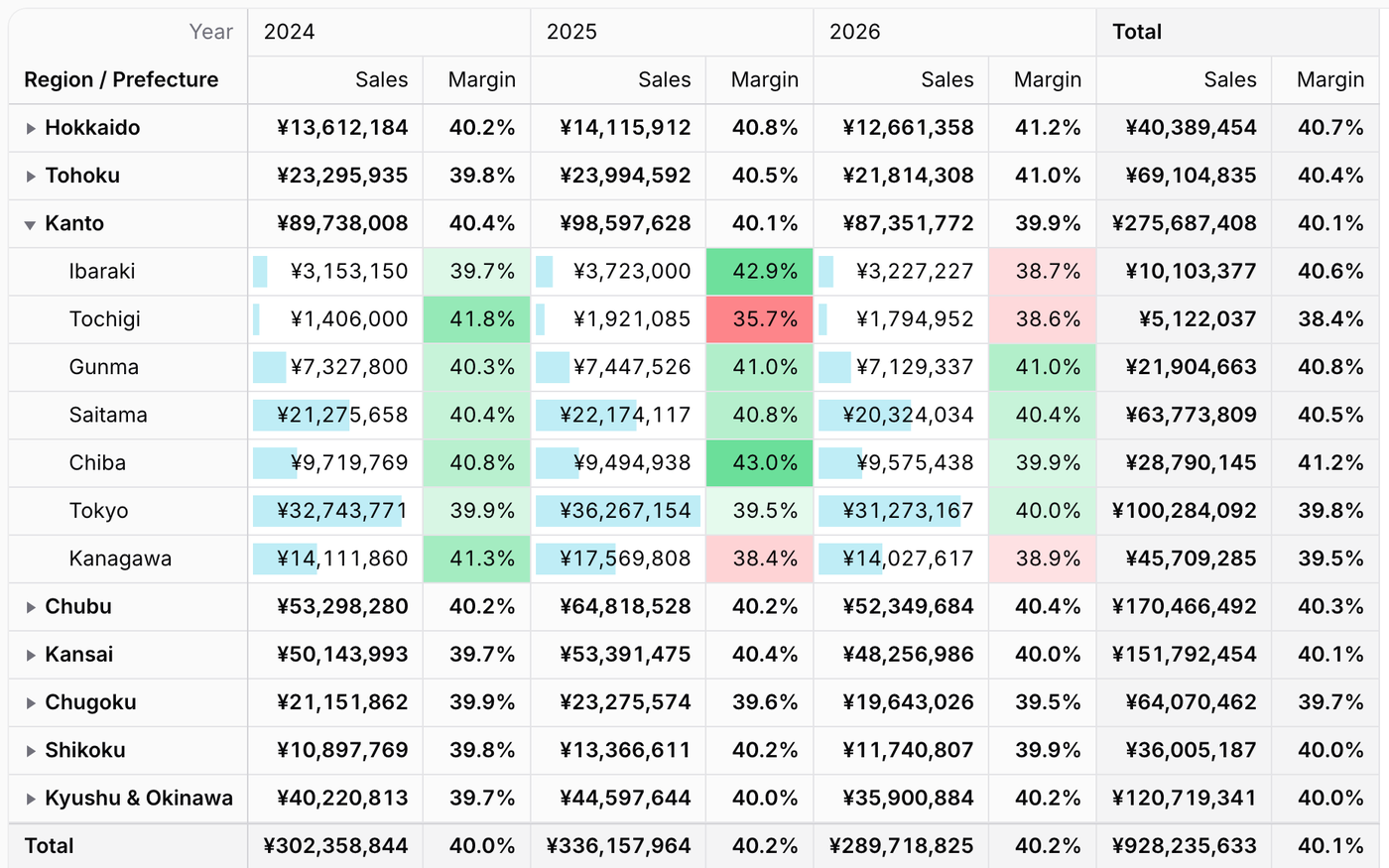
What it does
- Totals are worked out in the database with GROUP BY and drawn on a canvas; the demo has 1,000,000 sales rows
- Sum, count, average, median, ratios, SQL expressions and calculated values such as profit divided by quantity
- People drag fields into rows, columns, filters and values, and save their layouts by name
- Turn the result into a column, bar, line, area, pie, donut or scatter chart
- Double-click a cell to list, and edit, the records behind it; export to Excel, CSV, PDF and PNG
Watch it work
Short clips recorded in the live demo. Each one links to the page it was recorded on, so you can try it yourself.
200,000 sales, added up by your database
Open a region, drag Channel into the columns, sort by the total and select a range to see its sum.
Try it in the demo →Behind every number, the records
Double-click a cell, search and sort the sales behind it, and change a quantity in place: the totals follow.
Try it in the demo →Filter by what the numbers say
Keep the last three months, then only the regions whose sales in them are over $200K.
Try it in the demo →Formats and rules as formulas
Losses in parentheses, a dash for empty cells, times of day, and a rule that looks at the sales and the margin.
Try it in the demo →The table and its chart, together
Show both, switch to stacked columns, hide a year from the legend and click a bar for its records.
Try it in the demo →A new value for every record
Write [amount] - [cost] in the field panel; the profit of every sale is added up in SQL.
Try it in the demo →Dark mode and ten languages
The canvas follows Filament's theme, and the menus, totals and dates follow the locale.
Try it in the demo →In your code
// A page of the panel
class SalesPivot extends PivotPage
{
    public function pivot(Pivot $pivot): Pivot
    {
        return $pivot
            ->query(Sale::class)
            ->rows([Relationship::make('store.state.region')->label('Region')])
            ->columns([Date::make('sold_at')->year()->label('Year')])
            ->values([Sum::make('amount')->label('Sales')->money('USD')]);
    }
}Install
After buying, you get an email address and a license key for the private Composer repository. The full steps are in the docs.
composer config repositories.qalainau composer https://qalainau.privato.pub/composer
composer config --auth http-basic.qalainau.privato.pub "your-email" "your-license-key"
composer require qalainau/filament-warp-pivotThen run the migrations for the plugin's own tables:
php artisan migrateQuestions about Warp Pivot
- No questions yet. Ask the first one.
More plugins
Filament + AI coding tips, by email
How to fit Warp plugins into your own app and pair them with Claude Code or Cursor: prompts that work, mistakes AI makes, real examples. Once or twice a month. Unsubscribe anytime.
Thanks! You're on the list.
