Warp Print
Invoices and labels your admins design
Admins lay out invoices, delivery notes, price tags and labels in the panel. Long item tables continue over pages, PDFs come from the same page, and your Excel forms are filled in place.
Single Project $49 · Unlimited Projects $99
1.0.3 passed all 42 setups · Nov 22, 2026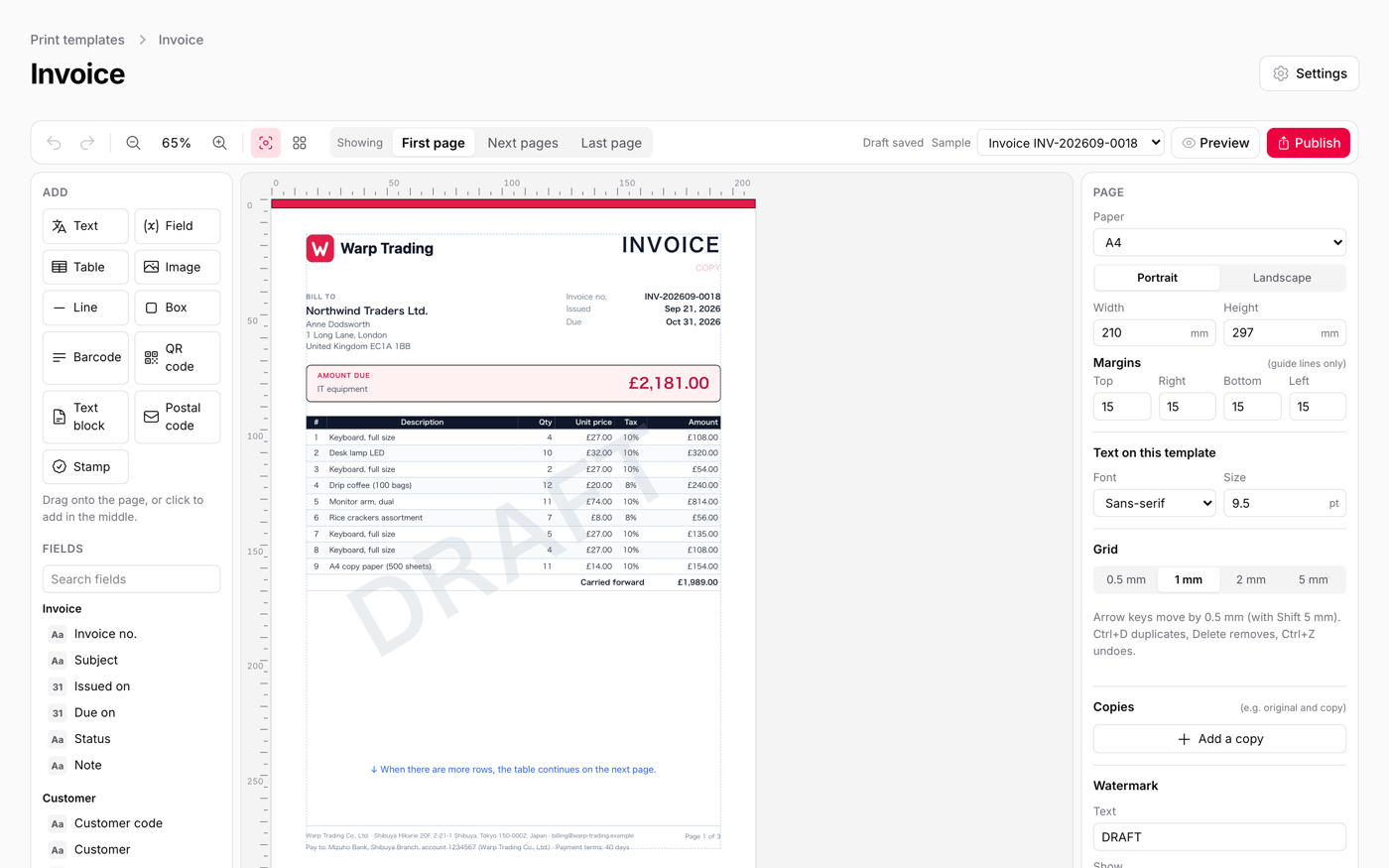
What it does
- A template designer in the panel: text, fields, an item table, images, lines, charts and nine kinds of barcode, with drafts and published versions
- Item tables that continue over pages with a repeated heading row and "carried forward" totals; what you see is what prints
- Print from the browser's dialog (which also saves PDFs), or make PDFs on the server with Chrome or Gotenberg for email attachments
- Use your own Excel invoice with {{customer.name}} in its cells, or place fields on a PDF or scan of a paper form
- Labels (addresses, price tags, name badges), a button that prints a filtered table, and ready-made invoice, quote, delivery note and receipt templates
Watch it work
Short clips recorded in the live demo. Each one links to the page it was recorded on, so you can try it yourself.
Design an invoice in your panel
Search for a field and drag it onto the A4 page, starting with your logo. Add the invoice number, the total and the item table, preview it with a real invoice, and publish.
Try it in the demo →A long invoice, printed page after page
An invoice with 80 rows runs onto three pages. The first page ends with the total carried forward, the next one repeats the heading and brings the total forward, and the last page has the totals.
Try it in the demo →Price tags and labels with real barcodes
Tick products and press Print price tags: the price with tax and an EAN-13 barcode, 21 to a sheet. Say how many labels of a half-used sheet are gone and printing starts after them.
Try it in the demo →Your own Excel invoice, filled from the record
Upload the Excel file you already use and write {{fields}} in its cells. Print from any invoice and download it filled in: your fonts, borders and merged cells stay, and the item rows are added.
Try it in the demo →Fill in a PDF form on screen
Start a new form and type straight onto the page, where each field sits as it does on the paper. Boxes take one character each, with ticks and dates, and you sign before you submit.
Try it in the demo →Questions about Warp Print
- No questions yet. Ask the first one.
More plugins
Filament + AI coding tips, by email
How to fit Warp plugins into your own app and pair them with Claude Code or Cursor: prompts that work, mistakes AI makes, real examples. Once or twice a month. Unsubscribe anytime.
Thanks! You're on the list.
