Dispatch field technicians from a Filament schedule board

It is eight in the morning at a repair company. Overnight, fourteen jobs came in: a blocked drain, a fuse box, a dishwasher that will not drain. Four technicians are on the road today, each with their own skill and some jobs already booked. The dispatcher has to put each new job on someone's day, without giving anyone two jobs at once.
In a plain Filament panel this is a form per job: open it, pick a technician, type a start time, save, then check another list to see whether that technician was already busy at that time. With fourteen jobs, the dispatcher keeps a paper timeline on the side.
This article shows the dispatch page of the Warp Scheduler demo: a day timeline with one row per technician, the waiting jobs in an ordinary Filament table next to it, and assigning a job by dragging it onto a row. All pictures are from the live demo.
The scene: the board and the waiting jobs
On the left, the field team's day, from 08:00 to 18:00, with a row per technician and their skill under the name. On the right, the jobs waiting for a technician, with priority and length.
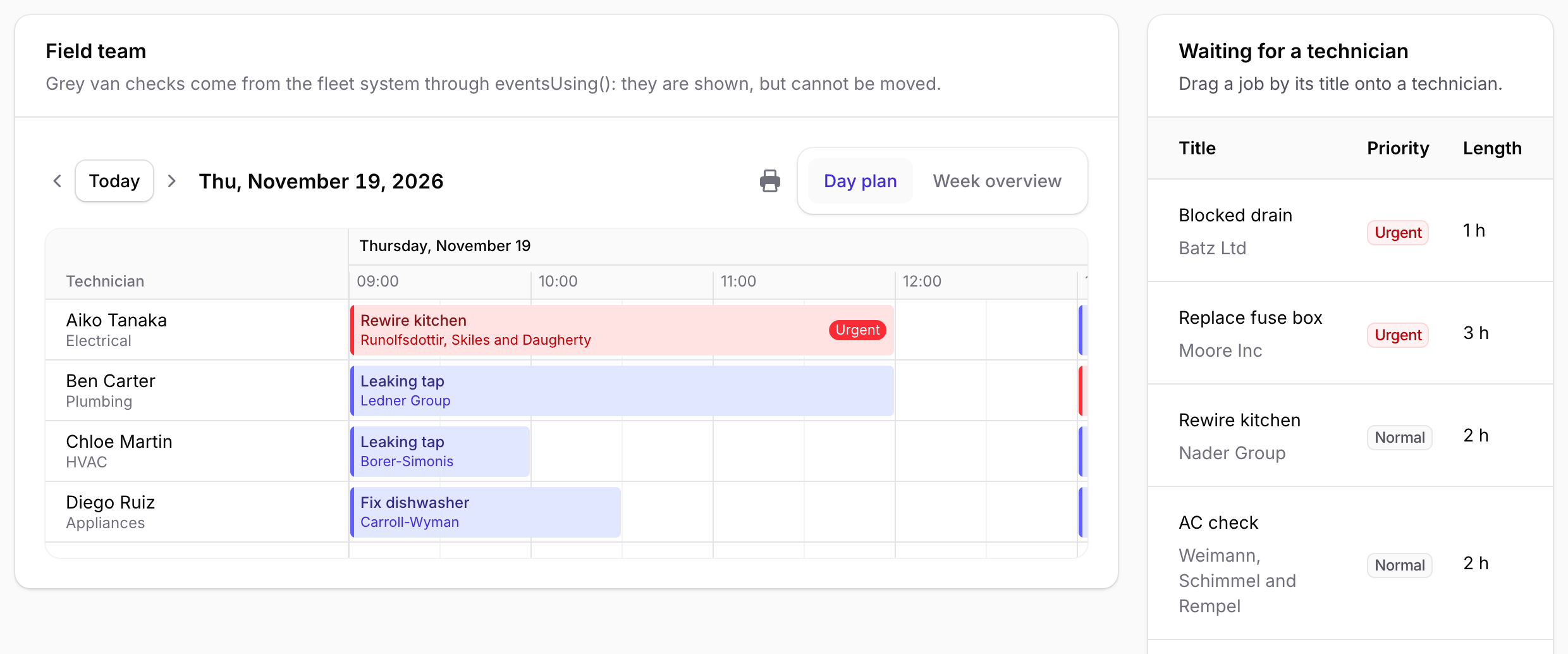
Step 1: a scheduler with a row per technician
The board is a Filament widget that uses Warp Scheduler. The rows are your Technician records, the boxes are your WorkOrder records, and NoOverlap keeps one job per technician at a time.
use Qalainau\FilamentWarpScheduler\Conflicts\NoOverlap;
use Qalainau\FilamentWarpScheduler\Enums\SchedulerView;
use Qalainau\FilamentWarpScheduler\Enums\TimelineZoom;
use Qalainau\FilamentWarpScheduler\EventSource;
use Qalainau\FilamentWarpScheduler\Scheduler;

public function scheduler(Scheduler $scheduler): Scheduler
{
    return $scheduler
        ->resources(fn () => Technician::query()->where('team', 'Field')->orderBy('name'))
        ->resourceLabel('Technician')
        ->resourceDescription('skill')
        ->views([SchedulerView::ResourceTimeline])
        ->timelineZooms([TimelineZoom::Day, TimelineZoom::Week])
        ->visibleHours('08:00', '18:00')
        ->conflictRules([NoOverlap::make()])
        ->onExternalDrop(fn (array $data, CarbonImmutable $start, ?Technician $resource): ?WorkOrder =>
            $this->assignWaitingWorkOrder($data, $start, $resource))
        ->events([
            EventSource::make(WorkOrder::class)
                ->resource('technician_id')->start('starts_at')->end('ends_at')
                ->title('title')->subtitle('customer')
                ->color(fn (WorkOrder $record): string => $record->priority === 'urgent' ? 'danger' : 'primary'),
        ]);
}
Step 2: make the table rows draggable
The waiting jobs are a normal Filament table widget. Filament 5 tables have no row attributes, so the title column carries the attributes the scheduler looks for, and that cell becomes the handle to drag:
TextColumn::make('title')
    ->description(fn (WorkOrder $record): string => $record->customer)
    ->extraAttributes(fn (WorkOrder $record): array => [
        'draggable' => 'true',
        'data-warp-scheduler-draggable' => e(json_encode(['id' => $record->id])),
        'data-warp-scheduler-title' => $record->title,
        'data-warp-scheduler-duration' => $record->duration_minutes,
        'data-warp-scheduler-color' => $record->priority === 'urgent' ? 'danger' : 'primary',
    ]),
Wrap the JSON in e(). Filament does not escape attribute values, and an unescaped quote ends the attribute, so the drop would silently do nothing. duration gives the dragged box its length.
Step 3: drag a job onto a technician
The dispatcher grabs "Blocked drain" by its title and drags it onto Diego's row. While dragging, the board shows where it will land and the exact time.
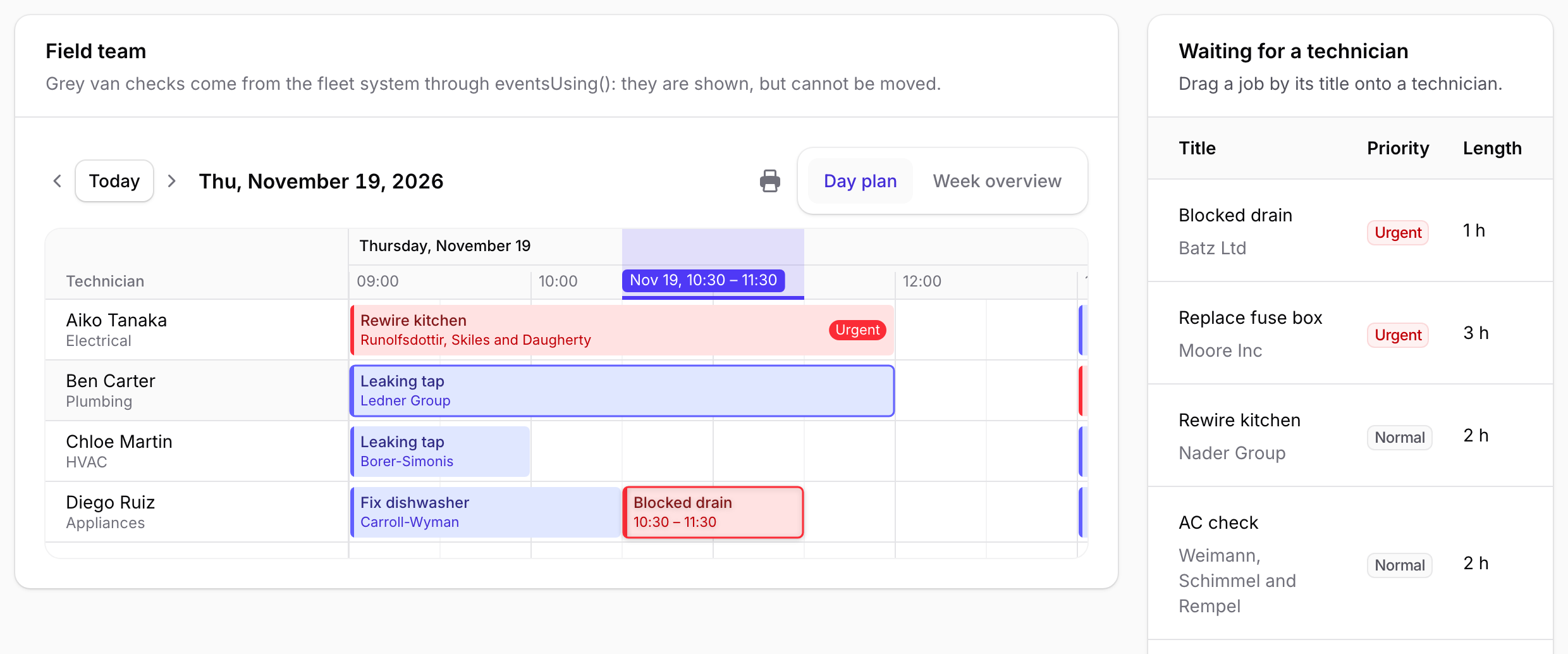
On drop, onExternalDrop() gets the id from the attribute, the start time under the mouse, and the technician of the row. Your callback books the job:
protected function assignWaitingWorkOrder(array $data, CarbonImmutable $start, ?Technician $resource): ?WorkOrder
{
    // $data comes from the browser: look it up in a scoped query, never fill() with it
    $workOrder = WorkOrder::query()->unscheduled()->find($data['id'] ?? null);

    if (! $workOrder || ! $resource) {
        return null;
    }

    $workOrder->update([
        'technician_id' => $resource->getKey(),
        'starts_at' => $start,
        'ends_at' => $start->addMinutes($workOrder->duration_minutes),
    ]);

    return $workOrder;
}
Return the record, and the board draws it at once. In the demo, the page also refreshes the table with the browser event the scheduler fires after a drop, so the job leaves the waiting list.
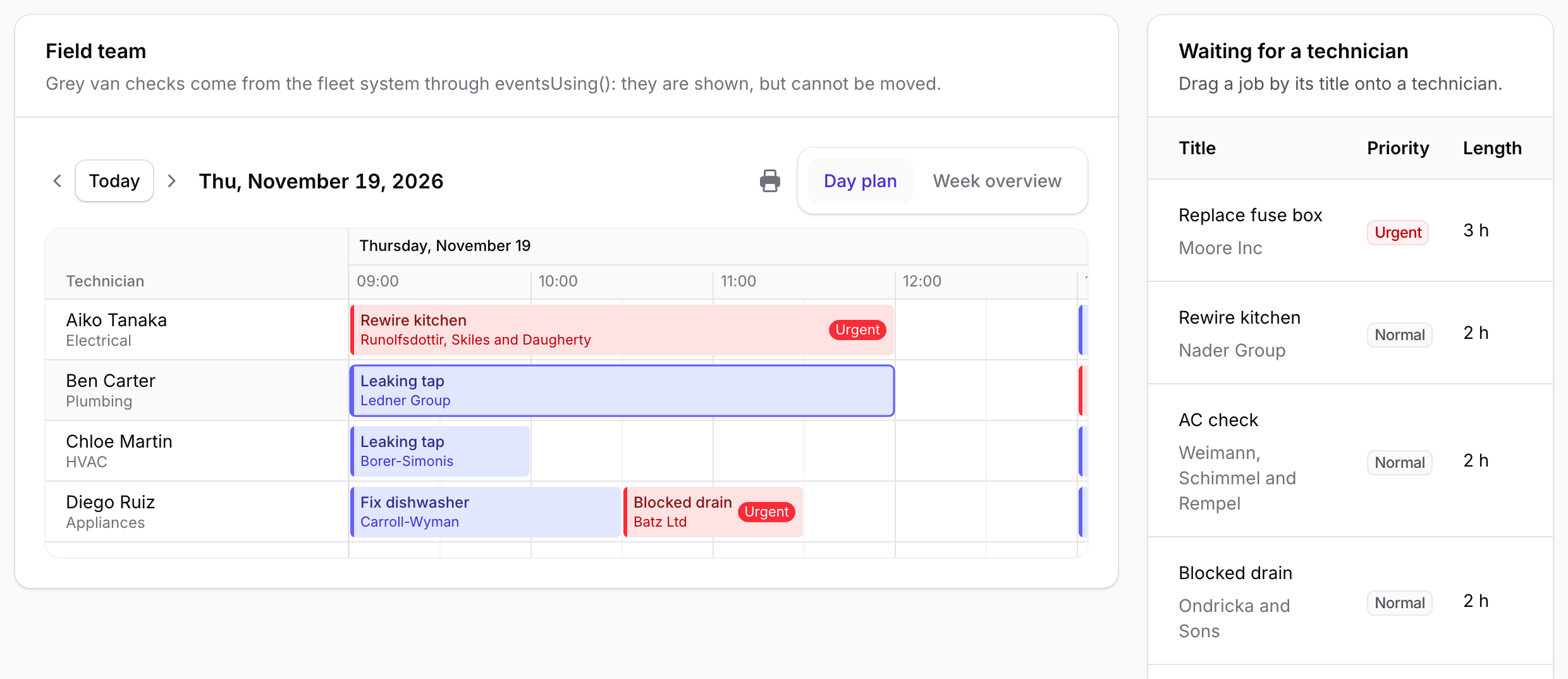
Step 4: the board says no to a double booking
Then the dispatcher has second thoughts: it is a drain, so the plumber should go. They drag the job up to Ben Carter, who already has a job from 09:00 to 12:00. Before they let go, the board shows a red band: "Overlaps another event".
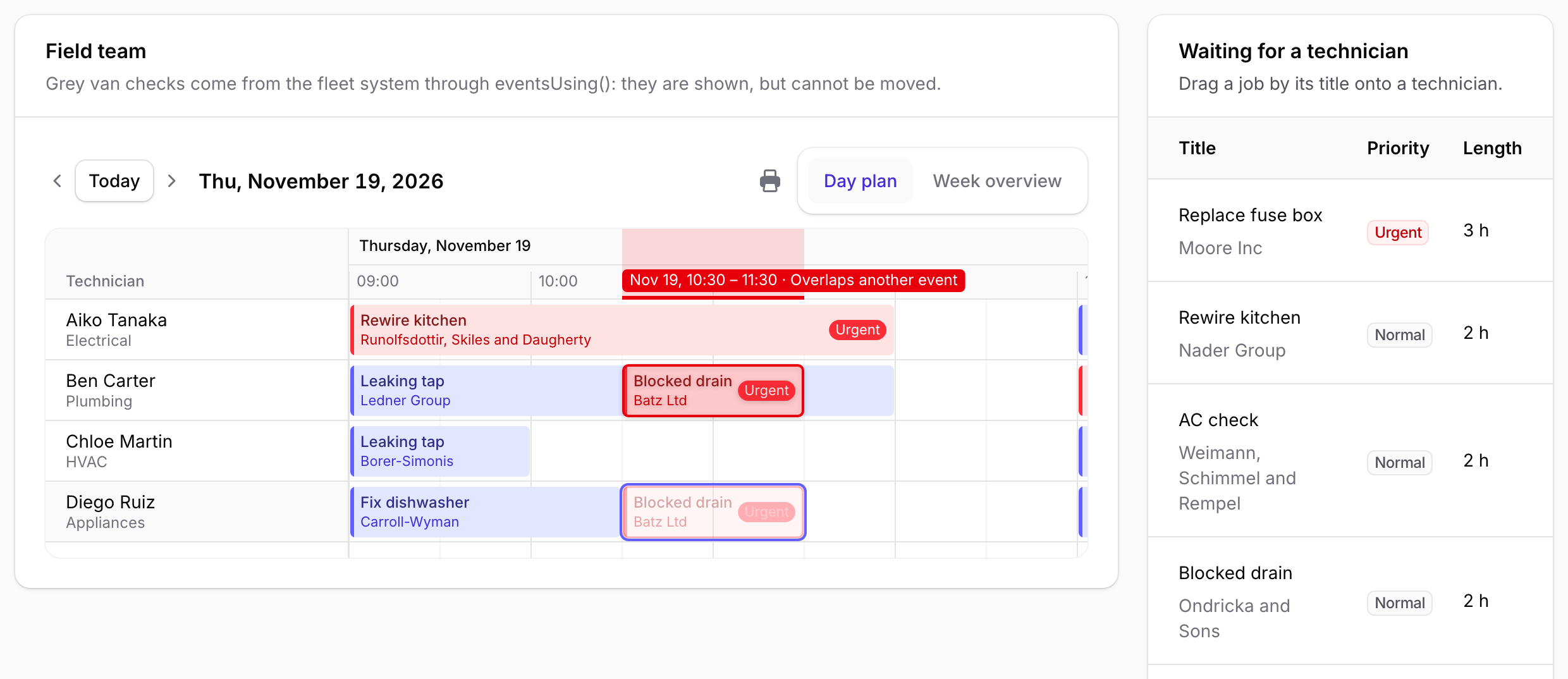
NoOverlap is checked while dragging. Dropped here, the job goes back to Diego with a message.The rules run again on the server when the change is saved, so a stale browser cannot get around them. Other rules work the same way:
->conflictRules([
    NoOverlap::make()->capacity('capacity'),   // some people can take two jobs at once
    WithinAvailability::make()->warn(),        // outside working hours: warn, do not refuse
    NoBlockedTime::make(),                     // holidays and blocked time
])
Throw ChangeRejected from your own code to refuse with your own message ("Chloe is not certified for gas").
Step 5: a job that runs long
Chloe is free from 10:00, so the job goes to her. The customer calls: it is worse than it sounded. The dispatcher drags the right edge of the box half an hour further.
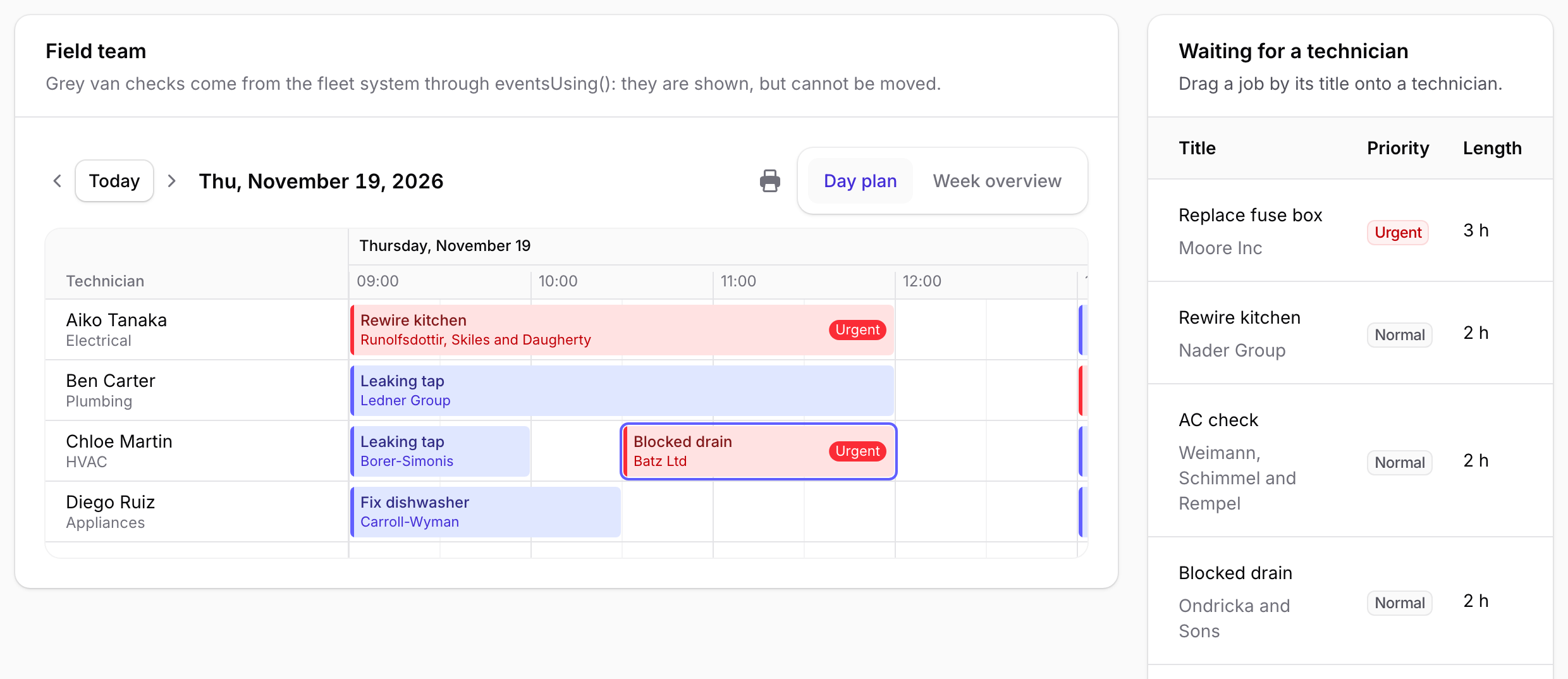
"Week overview" switches the same board to the week, which is where the dispatcher sees who is already full on Friday.
Other scenes
- Deliveries: orders onto vans or drivers.
- Lessons: requests onto teachers' rows.
- Care visits and interpreters: visits onto staff, with
WithinAvailabilityfor their hours. - Workshops: jobs onto machines or bays. Two boards on one page can hand jobs to each other with
onAdopt().
Limits worth knowing
- A job dropped where there is no row (no technician) gets
$resource = null. Decide in your callback what that means. The demo ignores it. - Rules are checked before the save's transaction. If two dispatchers drop onto the same slot within the same fraction of a second, both checks can pass. The README shows how to check again with a lock inside your callback.
$datacomes from the browser. Treat it like request input: a query scoped to the user and the tenant, and your policy.- No table to drag from?
unscheduledPool()lists the jobs with no start time next to the board, each with a button that books it into the first free slot.
Try it
Open the dispatch board. Drag a waiting job by its title onto a technician, then try to drag it onto someone who is busy. No sign-up, and the data is reset every hour.
